
Debug Commands
NOTE
This page assumes you have a HarmonyX project setup for R.E.P.O. modding.
If not, first follow the guide in HarmonyX Project Setup.
The Debug Console is a vanilla feature that was added in the Monster Update (v0.3.0).
Debug commands can be executed in the console, chat, or both depending on how you register your command.
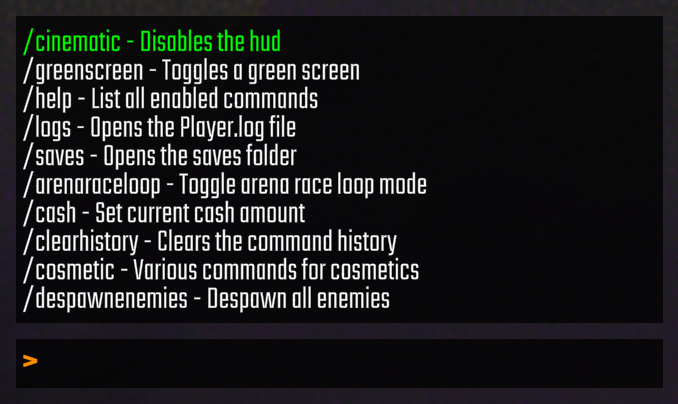
Chat Commands
Typing a command in chat requires you to prefix the command with a /.
Debug Console
Debug console commands can be executed at any time, including in the main menu and lobby menu, but the availability of certain commands will vary. Some commands are not available to clients; only the host.
Open the debug console by pressing the tilde (~) key. This is typically the key directly below Esc and to the left of 1.
NOTE
You must enable Developer Mode and Vanilla Developer Mode in the REPOLib config and restart the game to access the debug console.
Alternatively, you can use LobbyImprovements_REPO to enable the debug console by enabling its Debug Console/Enabled config setting. If your keyboard does not have the ~ key, LobbyImprovements_REPO also allows you to rebind the key (with its Debug Console/Keybind config).
TIPS
- Typing a command in the debug console does not require a
/prefix. - You can scroll through previous entries with the up/down arrow keys or the scroll wheel.
- When a suggestion is selected, press
Tabto auto-complete it. - You can click the middle mouse button to repeat the previous command.
- Valuables and Items spawn at the nearest Level Point, while Enemies spawn in a nearby room.
Registering Debug Commands
Registering a debug command:
using BepInEx;
using System.Collections.Generic;

[BepInPlugin("You.YourMod", "YourMod", "1.0.0")]
[BepInDependency("REPOLib", BepInDependency.DependencyFlags.HardDependency)]
public class YourMod : BaseUnityPlugin
{
    private void Awake()
    {
        // Call your command's Register method from your plugin's awake.
        MyCommand.Register();
    }
}

// Create a static class for your command logic.
public static class MyCommand
{
    public static void Register()
    {
        var cmd = new DebugCommandHandler.ChatCommand(
            // The name of your command.
            // This is what the user will type to execute it.
            // The name should not include spaces.
            "test",

            // The description of your command.
            "This is my test command",

            // The Execute method of your command.
            Execute,

            // This argument is optional. Set to null to skip it.
            // This method provides additional command argument suggestions as the user types.
            // The user must type the full command name and a space before suggestions appear.
            Suggest,

            // This argument is optional and true by default.
            // This method determines whether the command should be enabled.
            IsEnabled,

            // This argument is optional and true by default.
            // If true, the command will only be accessible in the debug console and not in chat.
            debugOnly: false
        );

        REPOLib.Modules.Commands.RegisterCommand(cmd);
    }

    // isDebugConsole will be true if the command is executed from the debug console, and false if executed from chat.
    // args are additional options passed to your command.
    private static void Execute(bool isDebugConsole, string[] args)
    {
        // Call this function if your command executes successfully.
        DebugCommandHandler.instance?.CommandSuccessEffect();

        // Call this function if your command execution fails.
        DebugCommandHandler.instance?.CommandFailedEffect();

        // Display the result of your command in-game.
        DebugConsoleUI.instance?.SetResponseText(
            // Rich text tags, such as color, are supported and used in vanilla.
            "This is a <color=green>Test</color>",

            // The default color of the response text.
            Color.white
        );

        // Optionally log the usage of your command.
        YourMod.Logger.LogInfo("Command Used: /test");
    }

    // The Suggest function only runs while typing in the debug console.
    // You must type the command name and a space first.
    // Every character added or removed runs the Suggest function again.

    // isDebugConsole will be true if the command is executed from the debug console.
    // partial is the latest argument string from args.
    // args is the full list of arguments.
    private static List<string> Suggest(bool isDebugConsole, string partial, string[] args)
    {
        // Return a list of possible arguments based on the current partial and args.
        return [];
    }

    private static bool IsEnabled()
    {
        // Add logic here if you want your command to be conditionally enabled.

        // Disables your command in the main menu.
        if (SemiFunc.IsSplashScreen() || SemiFunc.IsMainMenu())
        {
            return false;
        }

        // Disables your command in the lobby menu.
        if (SemiFunc.RunIsLobbyMenu())
        {
            return false;
        }

        // Disables your command in the tutorial.
        if (SemiFunc.RunIsTutorial())
        {
            return false;
        }

        // Disables your command if you are not the host.
        if (SemiFunc.IsNotMasterClient())
        {
            return false;
        }

        return true;
    }
}
TIP
You can refer to the vanilla DebugCommandHandler class to study how its own debug commands are registered (in its Start method), and how they function.